Related Blogs


Not sure whether your PAN is linked to Aadhaar? You can check the current PAN Aadhaar link status online through the Income Tax Department’s e-Filing portal without submitting a new linking request. The status check can tell you whether the linkage is successful, pending validation, or requires further action.
This guide explains how to check your status, understand the result, and decide what to do if your PAN-Aadhaar linking has failed or is still pending.
Quick Link: Check PAN Aadhaar Link Status
PAN-Aadhaar link status shows whether the Income Tax Department has recorded a successful connection between your Permanent Account Number (PAN) and Aadhaar number.
The Income Tax Department provides a Link Aadhaar Status facility on its e-Filing portal. Individuals can use the pre-login facility by entering their PAN and Aadhaar number. Registered users can also view the status after logging in through the relevant profile or dashboard options.
The status is particularly useful if you have recently submitted a linking request, corrected information in either database, or want to confirm that your PAN-Aadhaar linkage is already complete.
You do not need to submit a fresh Aadhar PAN card linking request simply to find out whether your PAN and Aadhaar are already linked. The Income Tax Department provides a dedicated Link Aadhaar Status option.
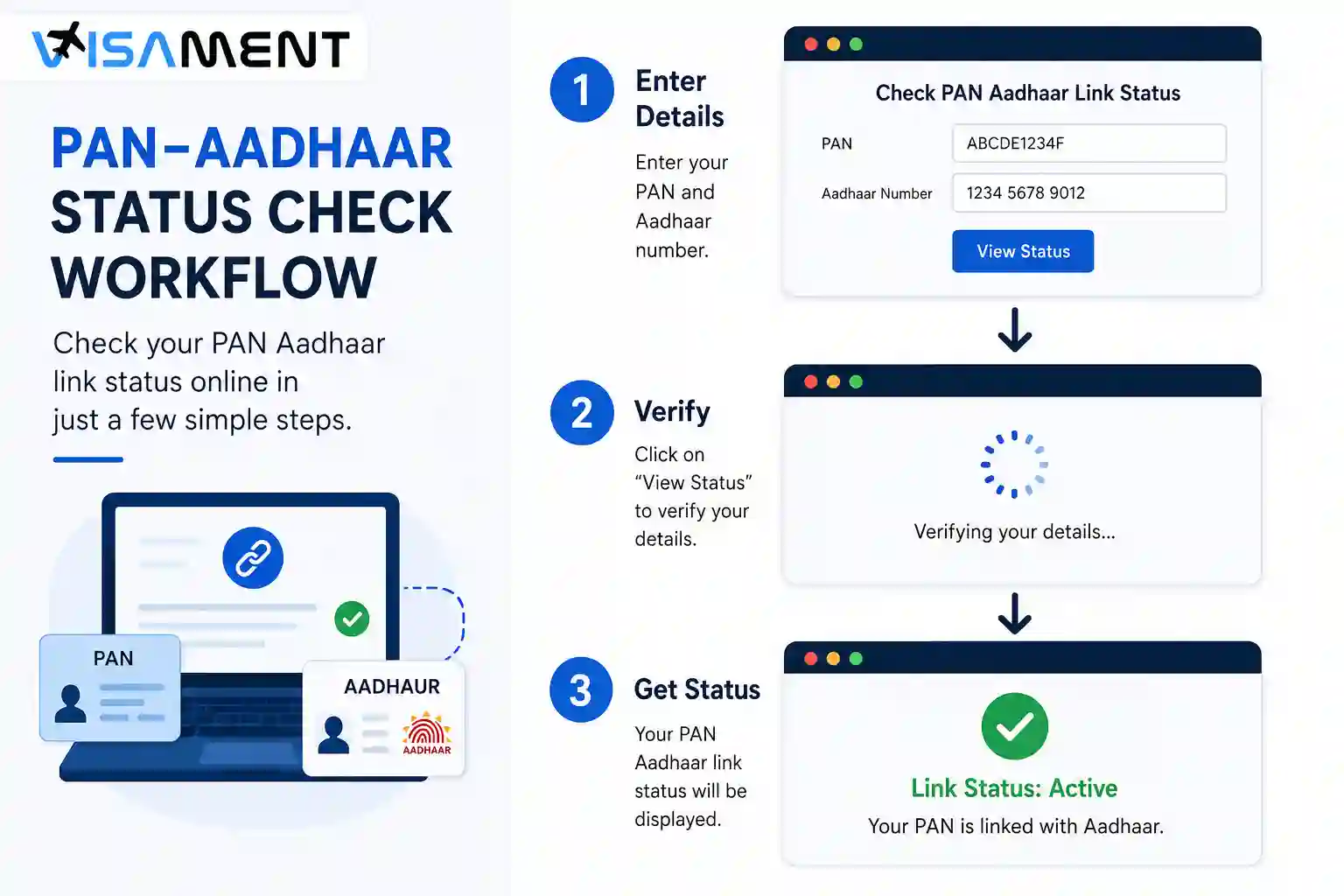
Go to the official Income Tax Department e-Filing portal. Avoid entering your PAN or Aadhaar details on unofficial websites that claim to provide a PAN-Aadhaar status check.
The Income Tax Department's current user manual identifies Link Aadhaar/View Status under the portal's Quick Links for pre-login users.
From the e-Filing portal homepage, select Link Aadhaar/View Status under Quick Links.
The exact wording or placement of portal options can change as the Income Tax Department updates its website, so use the current option displayed on the official portal.
Enter:
Then select the option to view the PAN-Aadhaar linkage status. The Income Tax Department's user manual confirms that these details are required for the pre-login status check.
Check the numbers carefully before submitting the request.
After successful validation, the portal displays the current PAN-Aadhaar linking status. If the request is still pending with UIDAI for validation, the portal indicates that the status is in progress and you should check again later.
Registered taxpayers can also check the status after logging in. The Income Tax Department currently provides access through the dashboard or My Profile → Link Aadhaar Status, depending on the account interface.
The exact message shown by the portal should be treated as the authoritative status for your PAN-Aadhaar linkage. Common situations include the following:
| Status/result | What it means | What you should do |
|---|---|---|
| Linked successfully | The PAN-Aadhaar linkage has been successfully validated and recorded. | No further linking request is normally required. |
| Linking in progress | Your request has been submitted and is awaiting validation. | Wait and check the status again later. |
| Linking failed | The requested linkage could not be validated. | Review the reason shown and resolve the underlying issue before trying again. |
| PAN not linked / inoperative | The PAN is not linked and may be subject to the consequences applicable to an inoperative PAN. | Follow the current official procedure for linking Aadhaar and making the PAN operative, if applicable. |
The Income Tax Department specifically states that a request pending with UIDAI requires the taxpayer to check the status later. If validation fails, the portal can direct the taxpayer back to the linking process.
If the status check shows that your PAN and Aadhaar are not linked, do not submit repeated requests without first checking the applicable requirements.
For individuals who are required to link PAN with Aadhaar, the Income Tax Department's current guidance provides a process involving the applicable fee where required, followed by submission of the Aadhaar-PAN linking request through the e-Filing portal.
The applicable rules can depend on when and how the PAN was issued and whether an individual falls within an exempt category. For example, the Income Tax Department's current FAQ notes a special requirement for certain PAN holders who originally received PAN using an Aadhaar Enrolment ID, with a 31 December 2025 deadline for linking their actual Aadhaar number.
If your PAN is already inoperative, check the latest Income Tax Department instructions before taking action because the applicable fee and reactivation procedure are governed by current tax rules.
A PAN-Aadhaar linking request can fail when information in the two databases does not match.
Common issues include differences in:
For example, a person's PAN may contain a shortened name while Aadhaar contains the person's full name. A difference created by a name change can also require one of the records to be updated.
The Income Tax Department advises taxpayers facing mismatches to correct the relevant information in the PAN or Aadhaar database. If online linking continues to fail, the department also guides biometric authentication through designated PAN service-provider centres in applicable cases.
Do not assume that the PAN always needs to be corrected. First compare the information in both records and determine which database contains the incorrect information.
If the problem involves PAN information, use the appropriate PAN correction process. If the Aadhaar information is incorrect, follow the applicable UIDAI update process.
After correcting your details or submitting a new linking request, check the PAN-Aadhaar status again.
A practical verification sequence is:
If the status remains pending, the Income Tax Department advises checking again later. If validation fails, follow the reason and instructions displayed by the portal instead of repeatedly submitting identical requests.
An NRI should not automatically assume that the same PAN-Aadhaar linking obligation applies to every individual taxpayer.
The Income Tax Department identifies Non-Resident Indians (NRIs) among the categories exempt from the Aadhaar-PAN linking requirement, subject to the applicable conditions and rules. The department also lists other exempt categories, including certain non-citizens, individuals aged 80 or above, and residents of specified states.
If you are an NRI, verify your status and the applicability of the linking requirement under the latest Income Tax Department guidance rather than relying on an older article or a general rule.
Your next step depends on the result:
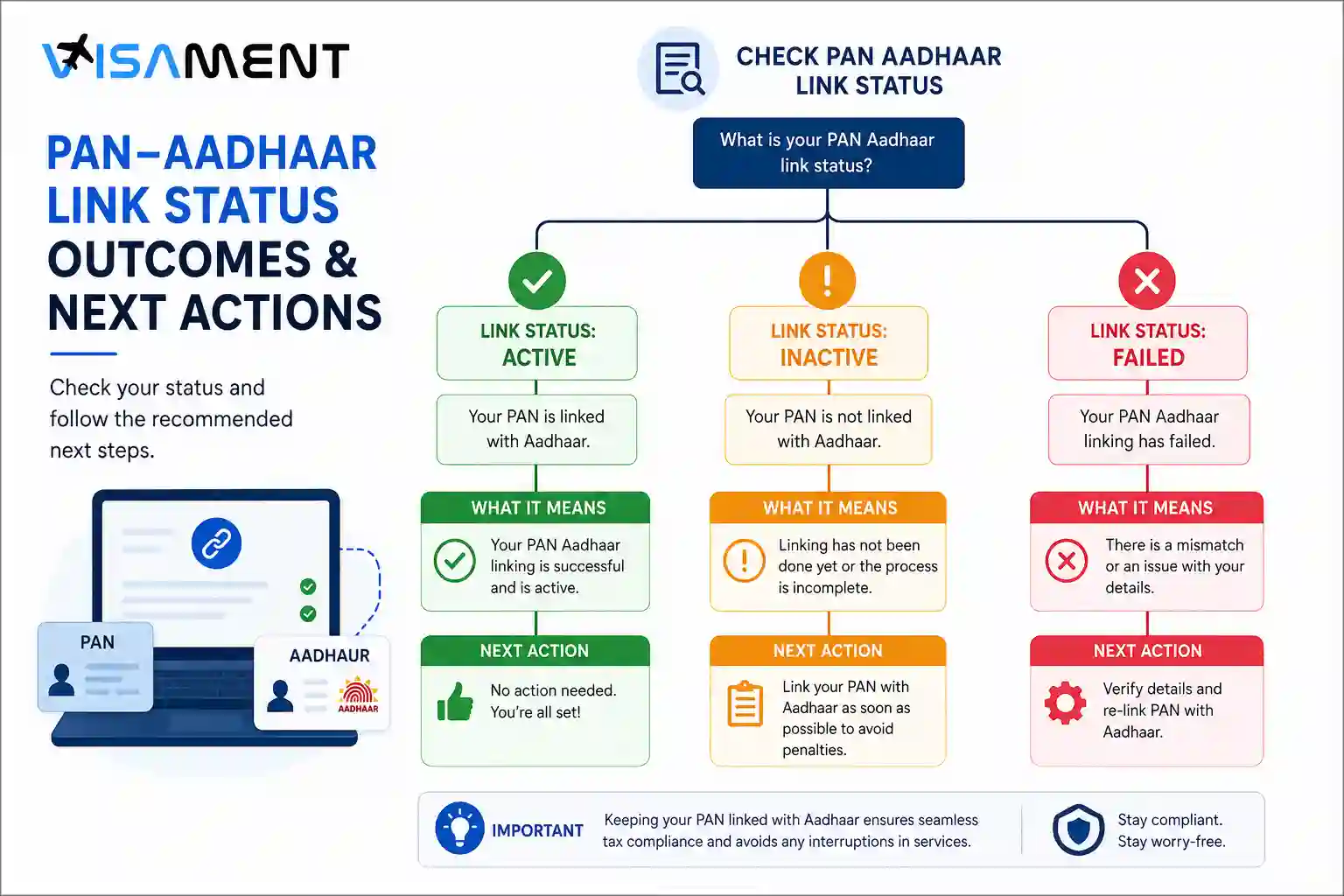
If the status shows linked: Keep the confirmation for your records. No new linking request is normally necessary.
If the status shows linking in progress: Wait for the validation process to finish and check the status again later.
If the status shows failed: Read the reason carefully. If the issue is a mismatch, compare the PAN and Aadhaar information and correct the appropriate record before trying again.
If the PAN is inoperative: Review the latest Income Tax Department procedure for making the PAN card operative and complete the applicable Aadhaar intimation and fee requirements.
Checking your PAN-Aadhaar status should be done through the official Income Tax e-Filing portal. If you need assistance with PAN documentation or correcting PAN-related information, a professional documentation service such as Visament can help you understand the documentation requirements, while the Income Tax Department remains the authority for your official PAN-Aadhaar status.
An inoperative PAN can have tax-related consequences until the PAN becomes operative again.
Under the current Income Tax Rules, an individual whose PAN becomes inoperative because of failure to intimate Aadhaar can be liable for the prescribed fee. Once the Aadhaar number is subsequently intimated after payment of the applicable fee, the PAN is provided for reactivation within 30 days from the date of intimation under Rule 162.
The rules also provide consequences during the period when the PAN remains inoperative. These include restrictions relating to tax refunds and other tax consequences. The Income Tax Department has also recently issued communications concerning refunds being held where PAN is inoperative because it is not linked to Aadhaar.
Because the consequences can depend on the taxpayer's circumstances and the rules applicable at the relevant time, check the latest official guidance before relying on a specific consequence.
Checking your PAN Aadhaar link status is a straightforward way to confirm whether your PAN-Aadhaar linkage has been recorded by the Income Tax Department. Use the official e-Filing portal to check the status, and if the result is pending, failed, or shows an inoperative PAN, follow the specific instructions applicable to that result.
Because PAN-Aadhaar rules, fees, deadlines, and portal procedures can change, always verify current requirements with the Income Tax Department before making a payment or submitting a linking request.
Yes, you are eligible to link your PAN card and Aadhaar card even after missing the last date. Visit the Income Tax Portal and pay the penalty of Rs 1,000 before linking.
If your PAN card has become inoperative because you have not linked it to an Aadhaar card. Then you have to pay a penalty of Rs 1,000 on the official Income Tax Department Portal, and then submit an Aadhaar-PAN linking request. After the verification has been done by UIDAI, your PAN will be reactivated within 30 days.
There can be different statuses shown when you try to check the status of your Aadhaar-PAN linking, such as: Aadhaar card is linked with PAN Aadhaar is not linked to the PAN card The Aadhaar PAN linking request is pending approval from the UIDAI.
To check your PAN-Aadhaar linking status, you do not need any type of documents. You should know your PAN number and Aadhaar number before sending the request to check the Aadhaar PAN card link.
If you have any mismatch in your name or date of birth, then the linking or status check can fail. You need to update the incorrect details either in PAN (visa PAN service centre) or Aadhaar (via UIDAI) first, and then you can recheck your PAN-Aadhaar linking status.
You need to pay a fee for Aadhaar-PAN linking, which is Rs 1,000, and it should be paid in a single challan.
Yes, you need to pay the penalty of Rs 1,000 first, and then only you will be eligible to apply for PAN-Aadhaar linking.
If your PAN card has become inoperative due to the reason of non-linking it with the Aadhaar card, it can become operative again within 30 days. You need to pay the penalty fees of Rs 1,000 and submit a PAN-Aadhaar linking request on the official Income Tax Portal.
Yes. The Income Tax Department specifically provides a Link Aadhaar Status facility for checking whether the submitted linkage request has been successfully validated or remains pending.
Yes, an NRI can use the e-Filing status facility where applicable. However, the more important question for an NRI is whether the PAN-Aadhaar linking requirement applies to their circumstances. The Income Tax Department currently identifies NRIs among exempt categories, subject to applicable rules.
PAN–Aadhaar linking is not compulsory for an individual who: Resides in Assam, Jammu & Kashmir, or Meghalaya. Is a non-resident under the Income-tax Act, 1961. Is 80 years or older at any time during the relevant previous year. Is not a citizen of India.
If you have already obtained your PAN card before 1 October 2024 based on the Aadhaar enrolment ID, you can complete the PAN Aadhaar link online until 31 December 2025 free of cost. Apart from these cases, you need to pay a penalty of Rs. 1,000 to complete the Aadhar PAN link and make your PAN operative.
Vipul Jain is the Co-Founder of Visament, a trusted platform dedicated to simplifying Indian immigration, consular, and NRI services for applicants across the globe. With extensive expertise in OCI cards, Indian passport services, visa assistance, apostille and document legalization,... See Full Bio

Talk to our documentation experts for free guidance on your application.



When you visit a website, it may store data about you using cookies and similar technologies. Cookies can be important for the basic operations of the website and for other purposes. You get the option of deactivating certain types of cookies, even so, doing that may affect your experience on the website.
It is required to permit the basic functionality of the website. You may not disable necessary cookies.
Used to provide advertising that matches you and your interests. May also be used to restrict the number of times you see an advertisement and estimate the effectiveness of an advertising campaign. The advertising networks place them after obtaining the operator's permission.
Permits the website to recognize the choices you make (like your username, language, or the region you are in). Also provides more personalized and enhanced features.
Aid the website operator to determine how the website performs, how visitors interact with the site, and whether there are any technical issues.