To apply for an OCI card, you need to submit your Photo for the OCI card, for which you need to follow some of the given guidelines, which are given by the International Standards Organisation (ISO) and the International Civil Aviation Organisation (ICAO).
An Overseas Citizenship of India is an important identity document that was introduced in 2005 for Indian origin citizens who have been living in foreign countries. If you are eligible for an OCI card, you can apply for it by visiting the official website of the OCI card services.
However, to apply for an OCI card, you need to make sure that you know all about the OCI photo requirements 2026 for the registration of your OCI.
What Should an OCI Card Photo Be?
Here are some of the basic needs of what an OCI card photo should be for the registration of an OCI application online.
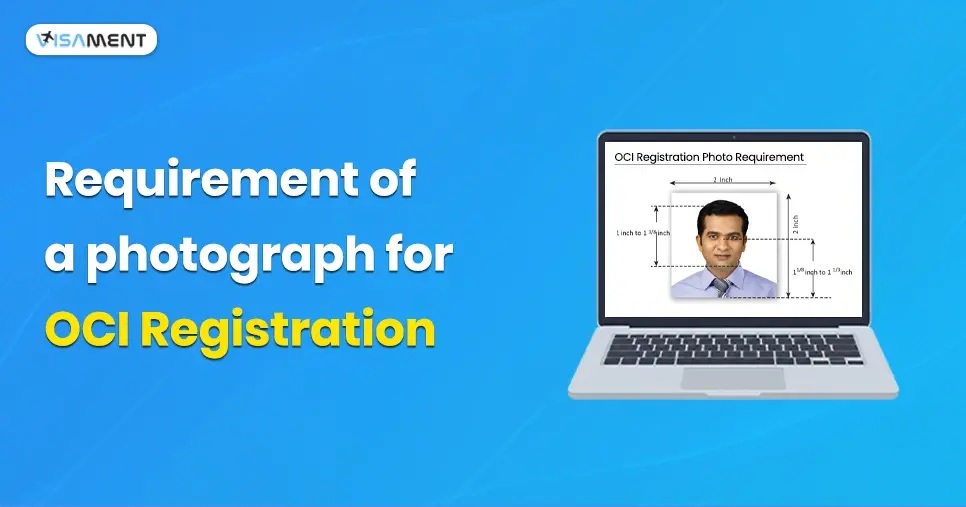
- The OCI card photo should be colourful, and the size of the photo for an OCI application should be 2 inches x 2 inches (51mm x 51mm).
- The photo must have a clear face and should be with the same tone quality.
- The participant's face should be clearly visible in the OCI photo, and it should not be covered with any glasses or face masks.
- Make sure your eyes and face, and your full front view, are clearly visible for your OCI photo.
- Your head should be in the middle of the OCI photo, and it must cover your face from your hair to your bottom of your chin.
- The background for the OCI photo should be plain white.
- Any covering on the head is not permitted except for any regional reasons.
OCI Photo Requirements
Here are the major requirements of an OCI card photo for the OCI registration.
1. How Many Photos are Needed for the OCI Card Registration
For the OCI card registration, you will need a minimum of 2 colored photos for which you need to upload online to the Online OCI website.
2. OCI Photos Size

The required minimum size of the OCI card photo is about 2 inches x 2 inches or 51mm x 51mm. Additionally, you can provide an online digital photo with a maximum size of 200 KB.
Photo should be covered with your head, which is approximately 1 inch of 1/8 inch (25mm to 35mm).
3. OCI Picture Format
The digital photo for the online OCI card application must be in the format of JPEG/JPG with a minimum dimension of 200 pixels x 200 pixels and a maximum dimension of 900 pixels x 900 pixels.
The validity of the OCI card photo is only for the last 6 months. You need to make sure that your appearance looks the same in the photo. If you have undergone any surgery or had any accident, then you need to click a new photo for your OCI card registration.
5. OCI Photos Quality
Here are some of the OCI photo quality which you need to make sure of while registering for the OCI card.

- The photos must be of high quality and in high resolution.
- OCI photo must be in a plain background and should be fully colourful.
- The photo must be an original and should not be a cutout or a scan.
- The OCI card photo must be printed on glossy photographic paper.
Here are some of the OCI card photos that cannot be used to apply for the OCI card application.
- If your OCI photo is damaged or torn on any side, then you cannot use that photo for your OCI card registration.
- If the photo is digitally changed from any Photoshop or uses filter, then in that condition, your photo will be rejected if you submit it for the OCI card registration.
- If the photo is blurred or has damaged pixels, in that case, you cannot use the photo for the OCI card application.
- If the photo for OCI is overexposed or underexposed, you cannot use it for the OCI registration.
6. OCI Photos, Lights, and Shadows

In your OCI card photo, the balance of the light in the photo must be equal on both sides, which will help to click a better picture more good without having any shadows. If you are clicking a photo for the OCI card, make sure there is normal lighting for the photo it is best for clicking OCI card pictures.
While clicking the photo for the OCI, you don't have any shadows on your face or any reflection on your face.
7. OCI Photo - Position and Background

The background for the OCI card photo must be plain white with normal light, and no visible objects should be there while clicking the OCI photo.
8. Facial and Head Expression in OCI Photo

It is most of the important aspects of the OCI photo. While clicking the OCI photo, you need to show your full face and make sure there is no covering on your face while your photo is being clicked, and make sure that your face is covered from the hair to the bottom of the chin.
Your eyes should be open, and your mouth should be closed, and you must make a neutral face while clicking a photo for the OCI card application.
9. Eyeglasses

You can wear your glasses for the OCI card application photo, but make sure that they are medically approved glasses, not casual or fashionable glasses. The glasses frame should not cover your face, and when clicking the picture for OCI, make sure that the reflection doesn't flash in the glasses. You can avoid the reflection by tilting your head a little bit.
10. Head Coverings

Make sure you have no cap or any head covering when clicking an OCI card photo. Except for any religious reasons, you can wear a hijab or turban.
11. Child OCI Photo

If you are a child under the age of 1 year, then there is no rule to have your eyes open. You can also have a picture with closed eyes.
The photo of a child 10 years or below should have a perfect face should is visible clearly, and the facial expression should be neutral with open eyes, closed mouth with no headgear or any glasses.
Do and Don't for the OCI Photo
Here are some of the dos and don'ts for the OCI photo for registration.
- You need to make sure the photo for the OCI application must be captured with your full face, where your eyes are clearly visible, and your head should be in the middle of the Photo. The
- An OCI card photo does not contain any shadows in the picture.
- The light of the OCI photo should be balanced to avoid any shadows.
- OCI card photo should be in the ratio of 2 inches x 2 inches or 51mm x 51mm.
- You need to make sure that the print quality is good, and it is not retouched, or that there are no filters or Photoshop used in the picture.
- The photo print quality must be high resolution.
- For the OCI card application, you can use both digital photos as well as a colourful printed photo.
- The digital photo for the OCI card registration should be printed without any visible pixels or dot patterns.
- Make sure you have adjusted the brightness and contrast of the photo according to the background.
- Make sure the OCI card photo has all the natural skin tones, and a continuous tone quality should be used while clicking pictures for the OCI photo.
- Your photo should not have any fluorescent or any unwanted colour cast, which can create improper colour balance.
- The head and eye position, background of the applicant in the OCI photo, should be in the middle of the photo, and your face should be properly covered.
- In your OCI picture, your face edges should be seen clearly.
- Eyes must be open while clicking the pictures for the OCI card.
Tips for the OCI Card Photo
Here are some of the tips for the applicant that they can use to make their online photo for the Overseas Citizenship of India.
- For the digital photo, you should make sure that you use a high-quality digital camera, which can help you provide high-resolution photos.
- Make sure that you have proper lights, which can help you avoid having shadows in the OCI photo.
- You need to dress perfectly for the OCI card photo. While clicking the pointer for the OCI, make sure you are not wearing any sunglasses or any tinted or casual glasses except for medically approved ones.
- For the OCI photo, you should not look anywhere else. Just make sure you look straight into the camera and open your eyes and mouth as close.
- You must maintain a neutral face while clicking photos for the OCI card application.
Chat to Support on Whatsapp
Stop worrying about delays. Apply now and get Indian Counsellor Services.
Chat Now Final Thoughts
If you are applying for the OCI card application, then you need to submit your passport-size OCI card photo. It should be according to the proper guidelines, which are given by the ICAO and ISO. Knowing all the OCI card photo requirements can be difficult for you to remember, so take help with the Visament website to make your process for the OCI card application easier and smoother.
At the Visament, you will get all the assistance for your OCI card photo, which includes photo quality, skin tones, facial expression, background, and lighting for the OCI card photo.
Apart from that, you will also get a simplified application process for the OCI card at the Visament with our experts' assistance, who are there 24/7 to help you with every step of the application. For more information or to solve your issues and doubts, you can visit our website and get help without active OCI card agents.


 Also Want to Know About