Related Blogs


An OCI application can run into problems involving incorrect passport details, missing documents, photograph or signature errors, jurisdiction, payment, verification, or application status. A deficiency or delay does not automatically mean that the application has been rejected.
The right solution depends on the specific issue and the stage of the application. This guide explains the most common OCI application issues, what to check, and when you should contact the concerned Indian Mission, Post, or FRRO.
| OCI problem | What may be wrong | What to do |
|---|---|---|
| Incorrect personal details | Name, date of birth, or passport information does not match supporting documents | Check the existing application and follow the applicable correction procedure |
| Missing documents | Required evidence was not uploaded or is inadequate | Review the deficiency notice and provide the requested documents |
| Photo/signature rejected | File or image does not meet OCI specifications | Upload a compliant photograph/signature |
| Deficiency or objection | Mission/Post/FRRO needs clarification or additional evidence | Follow the specific instructions provided |
| Status not updating | Application is still being processed, or additional action is pending | Check official status and email notifications |
| Payment problem | Transaction failed, or payment response was not received | Check transaction status before paying again |
| OTP/login problem | Registered contact or portal access issue | Verify registered details and use official support if necessary |
| Jurisdiction issue | Application was submitted to the wrong authority | Confirm the applicable Mission/Post/FRRO jurisdiction |
One of the most important OCI application checks is whether the information entered online matches the applicant's current passport and supporting documents. The official OCI registration system specifically instructs applicants to enter details according to their current passport.
Check details such as:
If you discover an error before submission, correct it before completing the application. If the application has already been submitted, do not assume that creating another application is automatically the correct solution.
For certain incorrect particulars on an existing OCI record, the official OCI Miscellaneous Services facility provides a separate route for registered OCI Cardholders. It specifically lists corrections involving personal particulars such as name, father's name and date of birth.
The appropriate procedure therefore depends on what information is wrong and whether you are dealing with a pending application or an already issued OCI record.
Have questions? Our experts guide you through every step your OCI Card Process– no confusion, no delays.
Consult an Expert TodayA document problem does not necessarily mean you need to abandon the application. If the concerned Indian Mission, Post, or FRRO identifies a deficiency in the application, uploaded documents, or photograph, the applicant can be informed by email and asked to provide the required material.
When responding to a document deficiency:
Do not upload an unrelated document simply because it appears to satisfy a file-upload requirement. For documents establishing Indian origin, the evidence required depends on the applicant's particular eligibility category.
If you are unsure which documents are appropriate, refer to the dedicated documents required for an OCI application guide rather than treating this troubleshooting article as a complete document checklist.
Photograph and signature problems are another common source of OCI application difficulties. The current OCI FAQ specifies requirements for photograph dimensions, square format, face coverage, background, image format, and file size. Photographs that do not meet the specified standards may be rejected and can delay processing.
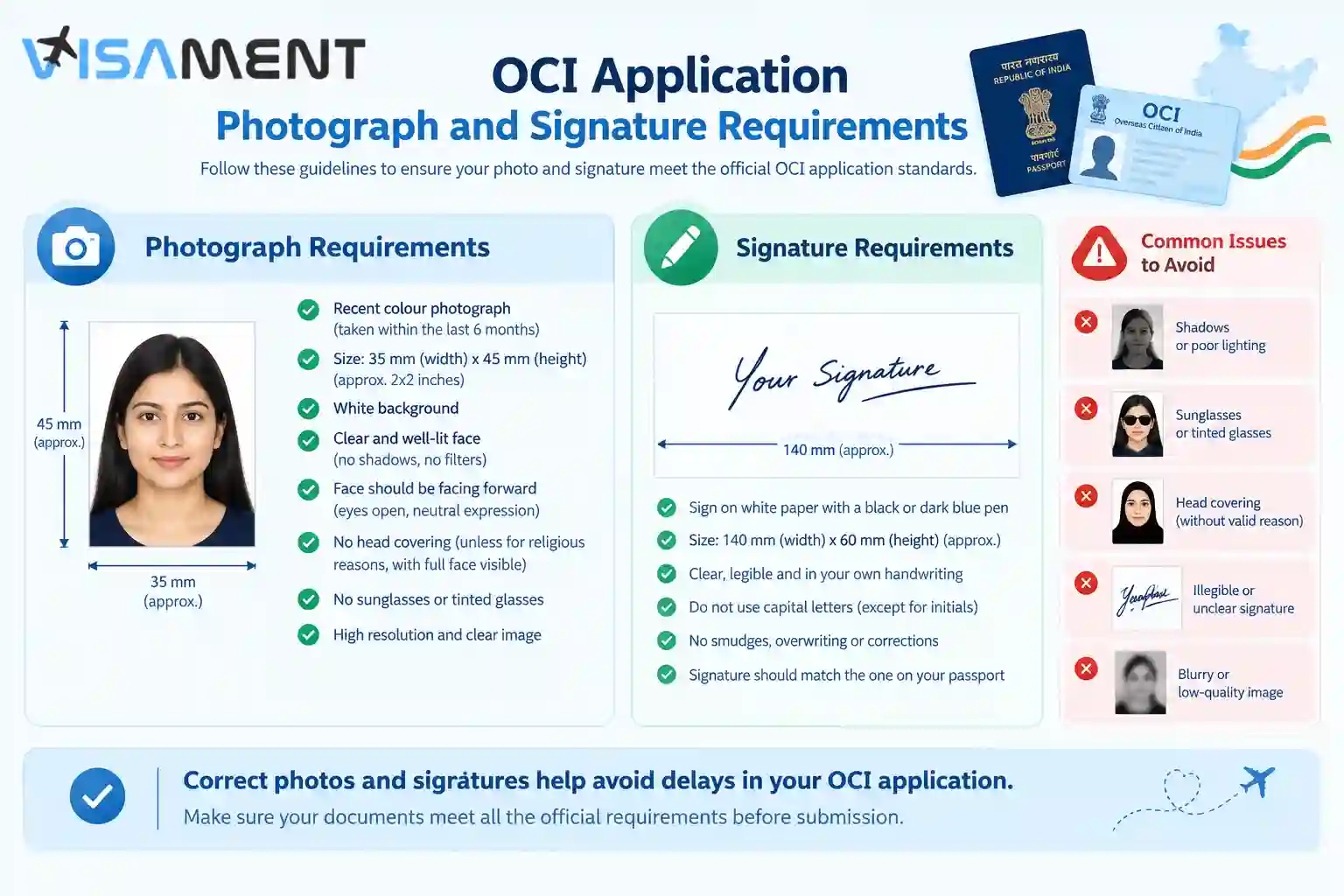
Before uploading a replacement, check:
Do not rely on an old photograph guide or instructions from an unrelated visa application. OCI requirements should be checked against the current official OCI Portal.
A deficiency or objection means the application requires further action or clarification; it should not automatically be interpreted as a final rejection.
The official OCI FAQ states that when there is a deficiency in the application, uploaded documents, or photograph, the concerned Indian Mission, Post, or FRRO can notify the applicant by email and request the required documents.
If you receive such a notification:
If the objection concerns eligibility, Indian-origin evidence, jurisdiction, or another substantive matter, simply uploading another document may not resolve the underlying problem.
A status that appears unchanged can be stressful, but an unchanged status does not by itself establish that an OCI application has been rejected.
The official OCI status-enquiry facility requires the Application ID and passport number to check the application.
If your status does not appear to be moving:
Do not assume that a lack of a recent status change means you should submit a second application. First establish whether the existing application is still active or whether the authority has requested additional action.
Payment problems require particular care because repeating a transaction too quickly can create unnecessary confusion.
The official OCI payment FAQ explains that, in some cases, an applicant's account may be debited without the OCI Portal immediately displaying a successful payment response. In such situations, applicants are advised to check the transaction status rather than immediately attempting another payment.
The official guidance states that when a transaction status is unknown after the account has been debited, the applicant should check the transaction through the OCI system. If the transaction is shown as failed, another transaction may then be attempted.
Therefore, do not make another payment simply because the success screen did not appear. Check the transaction first and retain the payment reference or order details.
Some OCI problems are technical rather than document-related.
For portal login or OTP issues, verify that you are using the registered email address or other required contact information. Check the spam or junk folder and try the request again after some time. The current e-OCI guidance also directs applicants to the designated helpdesk when an OTP problem continues.
For e-OCI problems, an error such as “Record Not Found” should first prompt you to verify that the particulars entered are correct. Changes to personal particulars or passport information must follow the prescribed OCI process rather than being treated as a simple e-OCI download problem.
OCI jurisdiction is another area where applicants can become confused, particularly when they hold one country's passport but live in another country.
For applicants outside India, the official OCI guidance states that original documents are generally submitted to the Indian Mission/Post having jurisdiction over the applicant's country of citizenship. Where the applicant is not living in the country of citizenship, jurisdiction can instead be based on the country where the applicant is ordinarily resident. Applicants residing in India submit originals to the jurisdictional FRRO.
The OCI Portal also defines “ordinarily resident” for relevant third-country applications in terms of continuous residence of six months, subject to the exceptions specified in the official guidance.
This is why an application should not be routed solely according to where a passport was originally issued. The applicant's current citizenship, residence, and applicable jurisdictional rules all matter.
For India-based applications, the applicable FRRO depends on the applicant's location. The official OCI FAQ provides the current FRRO jurisdiction list.
If the issue cannot be resolved from the official OCI Portal instructions, prepare the relevant information before contacting the authority.
Keep ready:
Use the authority responsible for your application rather than contacting an unrelated Mission or office. The official OCI Portal provides contact guidance for Indian Missions/Posts and the OCI Cell of the Ministry of Home Affairs.
Some OCI problems are straightforward technical issues. Others involve multiple documents, Indian-origin evidence, previous Indian citizenship, mixed-nationality families, spouse-based eligibility, or jurisdiction questions.
Professional document-review assistance can be useful when you need help checking an application for inconsistencies, organizing supporting documents, reviewing a deficiency response, or determining what information needs closer attention before submission.
Visament can assist with OCI application preparation, document review, and application-related support. The service should be used to improve application readiness and documentation—not as a guarantee of approval or a substitute for decisions made by the Government of India, Indian Mission, Post or FRRO.
OCI application issues are not all the same. A photograph error, document deficiency, incorrect passport detail, payment problem, status concern, and jurisdiction issue each require a different response.
The safest approach is to identify the exact problem, check the current OCI Portal guidance, follow any deficiency or objection instructions, and contact the responsible Indian Mission, Post or FRRO when further clarification is required. Avoid submitting a duplicate application, uploading unrelated documents, or making another payment until you understand what happened to the existing application.
Yes, you should update the details of your OCI card online each time you get a new passport. You don't have to apply for the renewal of the OCI cards while getting a new passport. Updation of the OCI card is free of cost on the online portal within three months.
Yes, you can travel to India without updating your OCI card, but make sure to carry your new foreign passport and your OCI card. Also, carry your old passport just to be on the safe side.
The new OCI rules simplify the renewal with passport updates. As of now, the applicants are not required to renew their OCI cards at an age less than 20 or more than 50, each time they get a new passport. They can just update the details online on the OCI services portal.
You can update your OCI card with the new passport details by uploading it on the Online OCI services portal using Miscellaneous services. You need to update it within 3 months of getting the new passport, and there are no charges for this.
Yes, you can travel to India with your new passport and an old OCI card, but it is important to update the details of your new passport on the OCI card by using the online miscellaneous services.
No, there is no need to renew your OCI card physically or apply for a new one after the age of 50. You just have to update the details of your new passport online and upload your recent photo just to capture your facial features. There are no charges for the online updation of your OCI card.
Read the return or deficiency communication carefully and follow the specific instructions provided by the concerned Indian Mission, Post or FRRO. A returned application does not automatically mean you must start a completely new application.
The appropriate correction route depends on the error and the stage of the application. Certain incorrect particulars can be addressed through OCI Miscellaneous Services for registered OCI Cardholders.
Check the transaction status before attempting another payment. The official OCI payment guidance specifically addresses transactions where the account has been debited, but a success response has not been received.
Check the official OCI status-enquiry facility and your registered email for deficiency or objection communications. An unchanged status alone does not establish that an application has been rejected.
Verify the registered email or mobile information, check the spam or junk folder, and try the request again after some time. If the issue continues, use the designated OCI helpdesk or contact the relevant authority.
Vipul Jain is the Co-Founder of Visament, a trusted platform dedicated to simplifying Indian immigration, consular, and NRI services for applicants across the globe. With extensive expertise in OCI cards, Indian passport services, visa assistance, apostille and document legalization,... See Full Bio

Talk to our documentation experts for free guidance on your application.

When you visit a website, it may store data about you using cookies and similar technologies. Cookies can be important for the basic operations of the website and for other purposes. You get the option of deactivating certain types of cookies, even so, doing that may affect your experience on the website.
It is required to permit the basic functionality of the website. You may not disable necessary cookies.
Used to provide advertising that matches you and your interests. May also be used to restrict the number of times you see an advertisement and estimate the effectiveness of an advertising campaign. The advertising networks place them after obtaining the operator's permission.
Permits the website to recognize the choices you make (like your username, language, or the region you are in). Also provides more personalized and enhanced features.
Aid the website operator to determine how the website performs, how visitors interact with the site, and whether there are any technical issues.