When applying for the OCI card, if your OCI application number or OCI record isn't found, verify the application reference number and passport details.
When checking the application status, you see that the OCI record isn't found. This can happen if you enter the wrong reference number, the OCI card application contains incorrect information, or your status isn't showing in the portal.
Do not assume that having this problem means that your OCI card application has been rejected or canceled. You can easily get your OCI number by providing correct information, ensuring all your details are valid, and using the right services for your application.
In this blog, we explain how to fix the OCI application number not found error and what "your OCI application status not found" means.
What Does "OCI Application Number Not Found" Mean?
The OCI application number not found message means your OCI number isn't displayed for the OCI card application. This message appears when you apply for an OCI application through the official OCI service portal. Applicants can use this number to check the status of the application they submitted to the official Indian Mission or the FRROs.
If your OCI number is not found, then you need to provide the following details:
- Application ID
- Passport Number
- Captcha verification
Your OCI number isn't found because the official portal has an error matching or retrieving the information associated with your OCI card application, or you see the "Record not found" error.
It simply means that your application record does not match any of the information you have entered. Also, don't assume that this "OCI record not found" status means your OCI application has been rejected.
Before troubleshooting the error, first determine what kind of applicant or OCI card you are, such as a fresh or new OCI card applicant, an existing OCI cardholder, or an e-OCI cardholder. Then check the troubleshooting requirements for when your OCI number isn't found.
Why is My OCI Application Number Not Found?
There are many reasons your OCI number may not be found, along with ways to prevent it.
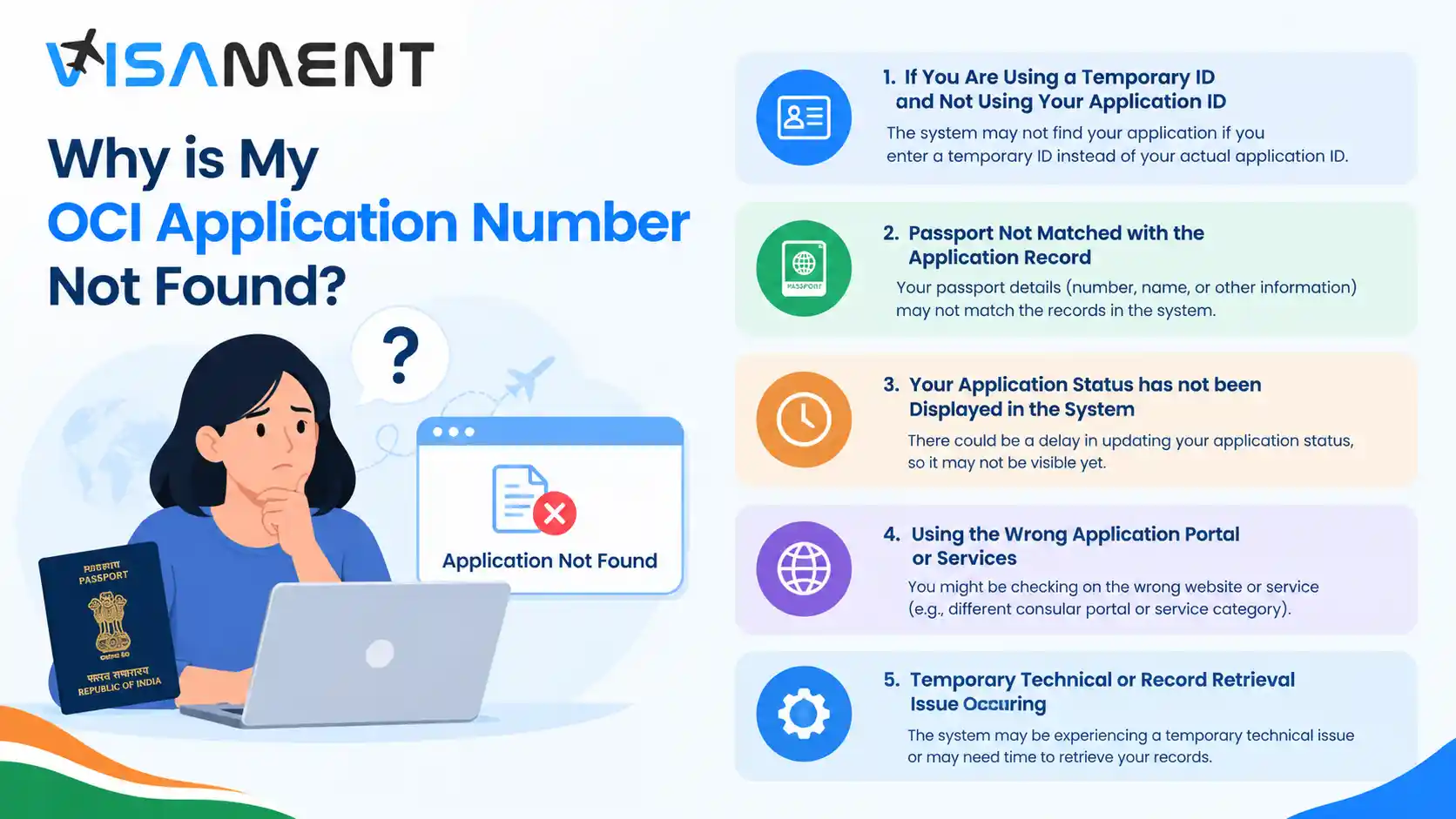
If You Are Using a Temporary ID and Not Using Your Application ID
Some applicants may have used their temporary ID, which they received when they first registered for the OCI application. However, you may have later received an acknowledgment or application ID but got confused and provided your temporary ID instead of the actual application ID.
You may have received these reference IDs for different submissions, such as fees, applications, or documents, instead of the actual application ID.
How to fix it: To avoid this error, check your OCI application confirmation email and acknowledgment. If you are unsure which reference number is correct, you can contact the authorities, who will provide the correct application ID for your OCI card application.
Passport Not Matched with the Application Record
If your OCI number is correct but your passport number is incorrect, it can also cause an OCI number error. Both are important for checking application status, so entering either incorrectly can affect the whole process.
Here are the common mistakes that applicants make:
- Providing an incorrect character or digit in the passport number.
- Adding a space to the passport number by mistake.
- Providing passport details unrelated to the OCI card application.
- Entering the new passport number while your OCI card is linked to the previous passport.
How to fix it: Verify the passport number you entered in the application acknowledgment form before submission. Match the passport number in your OCI card application with the original passport you linked.
If you applied to renew or reissue your passport, you must provide the original linked passport with the OCI card in the acknowledgment form. Do not enter the new passport number; use the linked original passport number.
Get Expert Help for Your OCI Card Service
Have questions? Our experts guide you through every step of the OCI Card Service – no confusion, no delays.
Consult an Expert Today Your Application Status Has Not Been Displayed in the System
If you have completed the online OCI application but the system does not display your application information or the OCI record is not found, you need to wait for the information to appear.
Completing your OCI registration is not the same as submitting it. Your OCI registration may depend on the documents, verification, and other requirements, as well as the applicable requirements of your jurisdiction.
According to the Ministry of Home Affairs, your OCI card application is acknowledged after the Indian Mission, post, or FRRO approves it and receives your supporting documents.
How to fix it: Here are some steps to resolve the OCI card number not found issue when you didn't provide the required information on the system portal.
- Make sure you completed the entire application submission process.
- Look for the OCI acknowledgment and the confirmation email from the authorities.
- Make sure the relevant authority has received your OCI application.
- For the latest application submission, you may need to wait a while after checking the application status.
- If there are errors in your application, you can contact the relevant authority for assistance and to help process your application.
There is no fixed time for the OCI card number to appear or for the OCI information to display on the system portal.
Using the Wrong Application Portal or Services
Make sure you select the correct service for your application, as the official OCI service portal offers many services, including OCI card renewal registration, OCI application status, OCI miscellaneous services, e-OCI card, payment-related services, etc.
These services do not use the same reference number; you will get a different reference number each time you use them.
How to fix it: To avoid this error, verify and confirm the services before entering your details.
- If you are a new OCI card user, use the official OCI card inquiry services.
- Existing OCI cardholders need to use the OCI miscellaneous services for personal updates and changes under the applicable instructions and guidelines.
- For the e-OCI card, use the official e-OCI services and follow all instructions and guidelines.
Temporary Technical or Record Retrieval Issue Occurring
Sometimes, due to a technical glitch or a record retrieval problem, your OCI number is not found, and you will get a " No OCI record found status.
If you are sure your passport number and application number are correct, avoid changing your information frequently so the tracker works.
How to fix it: Here are some ways to fix this issue.
- First, refresh the OCI status inquiry page.
- Re-enter your details correctly.
- Try to do after some time.
- Use another browser, or close all tabs and try again later in a new or private browser window.
- If the error persists, contact the relevant authority, such as the Indian Mission. Post or FRRO helpdesk.
How to Fix the OCI Application Status Not Found Error?
Here are simple steps to fix the OCI application number not found error.
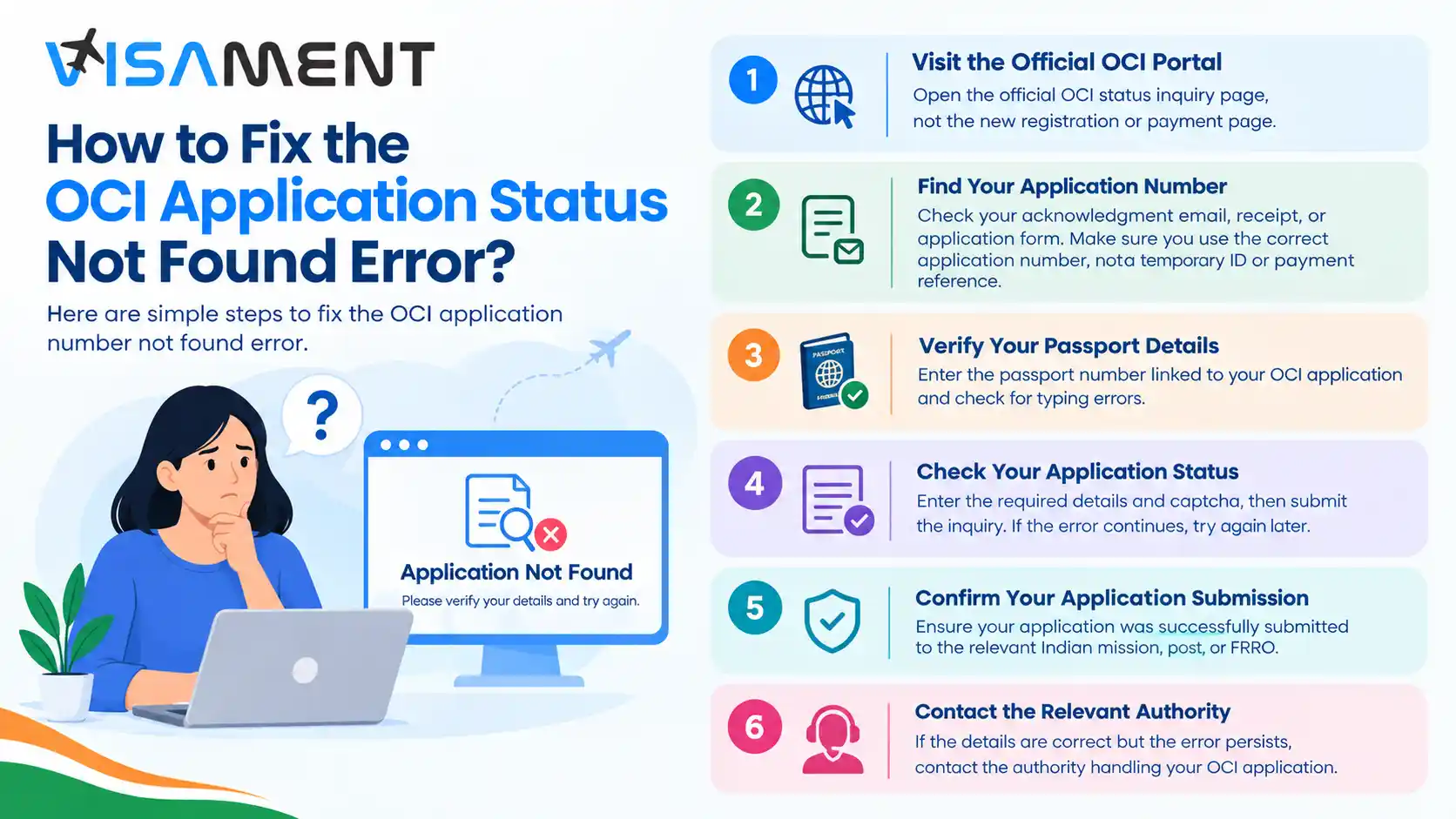
- Visit the Official OCI Portal: Open the official OCI status inquiry page, not the new registration or payment page.
- Find Your Application Number: Check your acknowledgment email, receipt, or application form. Make sure you use the correct application number, not a temporary ID or payment reference.
- Verify Your Passport Details: Enter the passport number linked to your OCI application and check for typing errors.
- Check Your Application Status: Enter the required details and captcha, then submit the inquiry. If the error continues, try again later.
- Confirm Your Application Submission: Ensure your application was successfully submitted to the relevant Indian mission, post, or FRRO.
- Contact the Relevant Authority: If the details are correct but the error persists, contact the authority handling your OCI application.
Provide the authority with all error details and required proof. Also, ask the authority to confirm your application status, whether the relevant Indian Mission/Post or FRRO has received your application, and whether your OCI record is available in their system.
Do not submit another application just because the application status tracker cannot find your OCI record.
What to Do If I Have Lost My OCI Application Number?
If you lost your OCI application number by mistake, you can recover it using the steps below before applying for a new OCI card.
- Check your confirmation email or acknowledgment in your email ID's spam or Inbox folder.
- Look for the saved application form or the receipt issued during the application process.
- Review the guidelines or instructions provided by the Indian Mission/Post, FRRO, or relevant application center.
- Ask for the application reference number if you have applied through any authorized application service provider.
- If you still do not receive your OCI Application number, contact the relevant authority (Indian Mission, Post, or FRRO) and provide all error details for assistance.
What if I Get a "Record Not Found" Error When Downloading the E-OCI Card?
Checking the e-OCI card application status differs from checking a physical application or a fresh OCI card application. To do this, go to the official OCI portal and enter your email ID, as stated in the official e-OCI card guidelines.
If you see a "Record Not Found" message when downloading your e-OCI card on the portal, first verify your application ID and passport number. Also, make sure you are checking it on the official website and using the correct services.
If the issue persists, contact the relevant Indian Mission/Post or FRRO in your jurisdiction for record-related problems.
For assistance, visit the official website to resolve errors and problems, and download instructions related to e-OCI card issues.
You can contact the following authority for the following purposes regarding jurisdiction-specific errors or issues with your OCI card application.
- If your application ID or passport number has no issues, but you still receive error messages.
- When you submit your OCI application but the confirmation is incomplete or hasn't been acknowledged.
- If you can't recover your OCI application number.
- If you corrected all the information, but the error message keeps popping up every time you try again.
- Getting the "Record Not Found" message while downloading your e-OCI card or accessing your OCI record.
So, the contact for application support depends on the issue or error. When contacting the authorities for application support, provide the following information: your name as it appears in the OCI record, the reference number, the submission date, and a description of the error. Also, follow all instructions and guidelines to avoid issues.
Final Thoughts
You may get the OCI application number not found or OCI record not found errors for several reasons. This can happen if you enter an incorrect application ID or passport number, the application status isn't available in the staye portal, or there's a technical glitch.
To fix this, first check the passport number, OCI application number, and submission status. For the e-OCI card, read all the instructions and guidelines before taking any other step. If the problem continues, contact the relevant Indian Mission/post or FRRO for help acknowledging your OCI application smoothly.
For more assistance, contact Visament experts, who will help you complete the process smoothly and locate your OCI application number without delays or interrupting processing.