Related Blogs


A PAN (Permanent Account Number) is very important for the individual for financial and identification purposes. Through a PAN card, you can file your Income Tax returns, open bank accounts, and invest in mutual funds.
Now, the process of obtaining a PAN card by filling out the physical application form and submitting the required documents is traditional. You can apply for an Instant e-PAN card using your Aadhaar card, which is quicker and easier than applying for a traditional PAN card.
In this blog, we will see the process of instant e pan card apply with Aadhaar, along with its eligibility, how to download the e-PAN, tracking status, and benefits.
Quick Link: Instant PAN Card
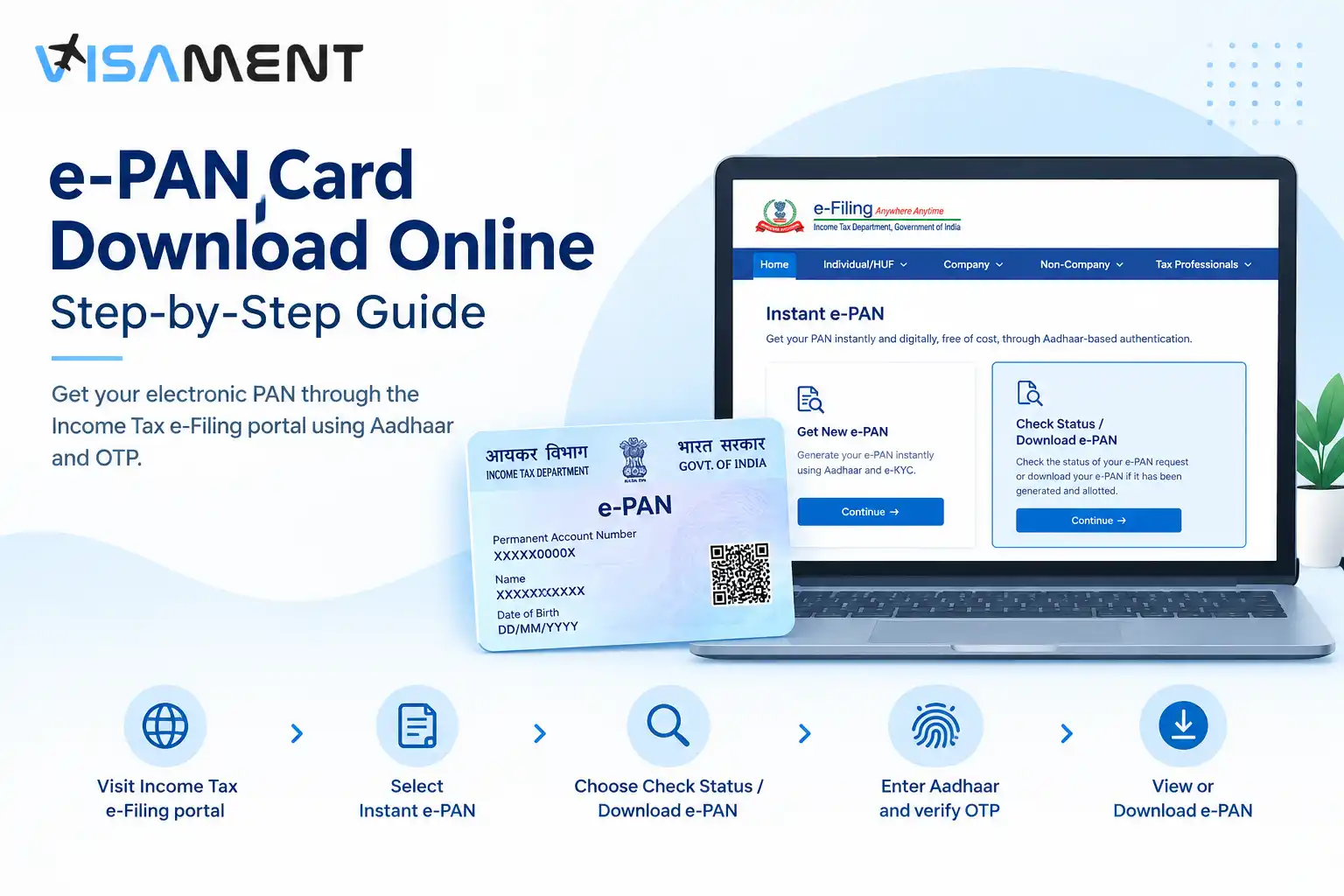
Here are the detailed processes given below for e PAN card apply with Aadhaar. Follow all the steps given below to get your Instant e-PAN hassle-free.
Here are the steps given below to instant PAN download through your Aadhaar card number.
For downloading the e-PAN card, you can go to the Income Tax Department e-filing website online.
Say goodbye to paperwork stress! Hassle-free PAN card Services
Apply NowHere are the eligibility criteria for the instant e-PAN card given below. If you meet all the conditions given below, then you can apply for the e-PAN card.
See the benefits of having an Instant e-PAN card by applying from an Aadhaar card.
Follow the steps given below to check the real-time status of your e-PAN card.
You can apply for an e-PAN card through the Aadhaar-based Income Tax e-filing portal. The Instant e-PAN helps provide you with a digital application without including any paperwork.
You can only apply for an e-PAN card if you do not already possess a PAN, and for a smooth PAN application, you can take help from the Visament website.
At Visament, you will get an easy application process through skilled and qualified agents. Reducing delays and chances of rejection of your e-PAN application.
For more information, you can contact the Visament website, where all our agents are available 24/7 to solve your queries and issues related to the PAN card application.
Although you cannot directly find your PAN number by using your Aadhaar card, you can check the status of your e-PAN card application, or you can also download it.
If you have already applied for and been allotted the instant e-PAN card, here are the steps you can follow: Visit the e-filing portal of the Income Tax Department. Go to the 'Instant e-PAN' and then click on the 'Check Status/Download PAN' option. Now enter your Aadhaar card number and the captcha code showing on the screen. If your e-PAN is allotted, then you can follow the instructions on the screen to download the PDF.
Yes, e-PAN is considered a valid form of the PAN card. This document is a legally signed PDF that is issued by the Income Tax Department, and it has the same recognition and legal status as a normal physical PAN card. You can use the e-PAN card in all the same places where the physical card is required. It includes filing taxes, opening bank accounts, or applying for credit cards or loans.
If you obtain an instant PAN card by using the Aadhaar-based e-KYC, then it will be completely free of cost. You don't have to pay any of the application fees or charges while using this process. All you need is a mobile number linked valid Aadhaar card, and you need to meet the eligibility criteria to get the e-PAN card instantly.
You can check the PAN card details by logging in to your account on the e-filing portal of the Income Tax Department. Then, go to the profile setting and you will find all the details there, such as your name, address, date of birth, etc.
There are no fees you need to pay for the e-PAN card through your Aadhaar number. The KYC for the instant e-PAN card is completely free of cost. You only need to provide your valid Aadhaar card, which is linked to your registered mobile number.
You should generate an e-PAN card because it can provide you with an instant version of a PAN card, which is also legally valid everywhere. It is useful for the sudden, paperless, and free identification.
Yes, the instant e-PAN card obtained by using an Aadhaar-based e-KYC is legally valid, and it can be used for the same purposes as a Physical PAN card. It is issued by the Income Tax Department and signed digitally.
You cannot get your e-PAN card directly by entering the Aadhaar number. For this, you need to log in to the Income Tax e-filing portal, then check the status of your instant e-PAN card or download your e-PAN card.
Vipul Jain is the Co-Founder of Visament, a trusted platform dedicated to simplifying Indian immigration, consular, and NRI services for applicants across the globe. With extensive expertise in OCI cards, Indian passport services, visa assistance, apostille and document legalization,... See Full Bio

Talk to our documentation experts for free guidance on your application.



When you visit a website, it may store data about you using cookies and similar technologies. Cookies can be important for the basic operations of the website and for other purposes. You get the option of deactivating certain types of cookies, even so, doing that may affect your experience on the website.
It is required to permit the basic functionality of the website. You may not disable necessary cookies.
Used to provide advertising that matches you and your interests. May also be used to restrict the number of times you see an advertisement and estimate the effectiveness of an advertising campaign. The advertising networks place them after obtaining the operator's permission.
Permits the website to recognize the choices you make (like your username, language, or the region you are in). Also provides more personalized and enhanced features.
Aid the website operator to determine how the website performs, how visitors interact with the site, and whether there are any technical issues.