Related Blogs

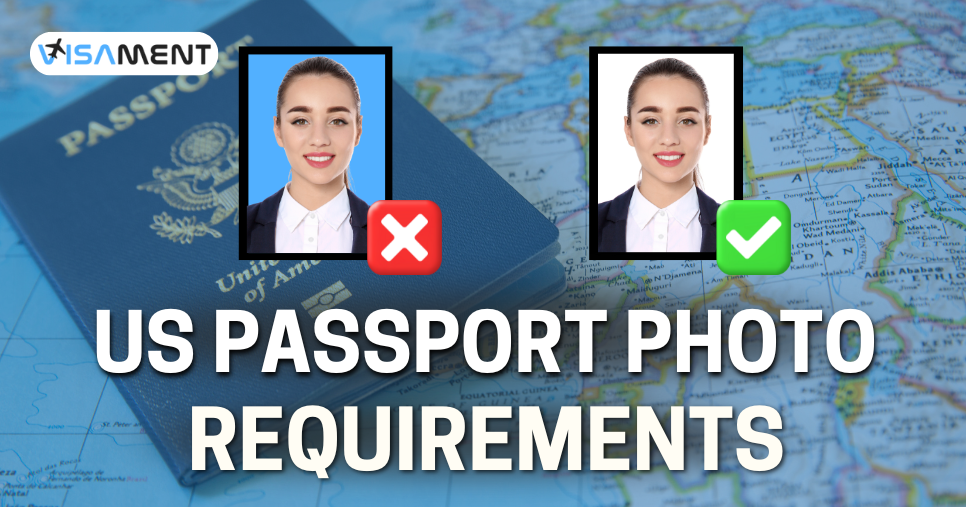
Providing a compliant photo is essential when applying for or renewing a US passport. Even minor errors in sizing, background, or lighting can cause frustrating application delays or outright rejections. This comprehensive guide outlines the US photo requirements of the official US Department of State, covering everything from dimensions and appearance rules to guidelines for infants, ensuring your submission is accepted on the first try.
All of the US passport photos must meet the specific technical requirements. Here are a few of them:
The US passport renewal photo requirements are also the same unless you apply online for it. In the online case, here are the additional rules;
 Also Want to Know About Types of U.S. Passports Check Now!
It is best that you wear everyday clothes such as a shirt, t-shirt, or V-neck that do not obstruct any part of the face. Here are some of the passport photo clothing requirements:
Here are a few things to keep in mind while putting on makeup for a US Passport Photo:
The best you can do is use natural-looking makeup or avoid it altogether.
Any kind of glasses is not permitted in the US passport photos, and they must be removed before clicking your picture; this also includes corrective eyewear.
However, US citizens who wear glasses for serious medical reasons then they can keep them for a passport photo, but you must show a signed doctor's statement.
Specific guidelines exist regarding the quality of photos submitted for US passport applications and renewals. For example, punctured, damaged, creased, or smudged passport photos will be rejected because of non-compliance with photo quality standards.
The youngest US citizens (i.e., infants, babies, and toddlers) have their own unique guidelines regarding passport photos. Here are some of the major differences:
If you apply for a U.S. passport, then ensure that you meet all the US passport photo requirements. Here are some of the common mistakes you should avoid:
Navigating passport photo regulations does not have to be a stressful process. By strictly adhering to these size, lighting, and appearance standards, you can confidently submit your application without the fear of setbacks.
For a complete error-free experience, you can take assistance from the experts of Visament. They have many years of experience and can help you in applying for error-free passport applications at very affordable prices.
No, you can’t show teeth in a passport photo.
The white, light gray, or light blue color shirt you can wear for the passport photo.
Yes, you can take a passport photo with your phone if you match the official requirement and camera quality or your phone is decent.
There are various reasons behind the disqualification of a passport photo. Including size, lighting, background, quality, facial expression, attire, accessories, editing, and red eye.
Yes, you can wear earrings in my passport photo but it is not recommended to wear large or noticeable earrings in your passport photo.
Because it can make it difficult to identify you
White, off-white, or patterns
Yes, you can wear your hair up in a passport photo
The rules for the passport photo are: Size should be 2x2 inches The photo should be in color Background should be in plain white or off-white Face should be visible clearly There should be no coverings like hats or scarves Minimal jewelry is acceptable
The dress code for the passport photos is given below: Avoid wearing white or gray clothes, as camouflage attire should be avoided. Opt for dark color clothes. Uniforms are not allowed to be worn in passport photos. Don't wear any head accessories like hats or scarves. Headphones or earphones should be removed. Choose the minimal jewelry to wear.
According to the US State Department, the only acceptable size of a US passport photo is 600x600 pixels.
Turtlenecks are not recommended for a passport photo. The face and neck of the applicant must be visible, and this clothing cannot obscure any part of them. It is better to choose a simple shirt ot even a T-shirt.
Vipul Jain is the Co-Founder of Visament, a trusted platform dedicated to simplifying Indian immigration, consular, and NRI services for applicants across the globe. With extensive expertise in OCI cards, Indian passport services, visa assistance, apostille and document legalization,... See Full Bio

Talk to our documentation experts for free guidance on your application.
When you visit a website, it may store data about you using cookies and similar technologies. Cookies can be important for the basic operations of the website and for other purposes. You get the option of deactivating certain types of cookies, even so, doing that may affect your experience on the website.
It is required to permit the basic functionality of the website. You may not disable necessary cookies.
Used to provide advertising that matches you and your interests. May also be used to restrict the number of times you see an advertisement and estimate the effectiveness of an advertising campaign. The advertising networks place them after obtaining the operator's permission.
Permits the website to recognize the choices you make (like your username, language, or the region you are in). Also provides more personalized and enhanced features.
Aid the website operator to determine how the website performs, how visitors interact with the site, and whether there are any technical issues.