It is necessary to upload a digital photo for the Indian visa application with the correct dimensions and requirements. If you are looking for an organized and easy-to-follow guideline regarding Indian visa photos, then you have come to the correct place. Whether you take the photo by yourself or let a professional take it for you, it must follow all the size, color, pixel, etc., guidelines.
In this blog, we have mentioned all the requirements that you need to follow as per the India e-Visa photo guidelines. This will prevent your application from getting rejected because of incorrect photo uploads.
Quick Overview: Indian Visa Photo
- The photo size should be 2x2 inches for Indian visa applications and should be in color.
- There are a few exceptions for infants, such as that they can keep their eyes closed, and the authorities are flexible regarding their facial expressions and eyes.
- Covering the head is not permitted unless it is for religious or medical purposes.
- You need to maintain a neutral expression and look straight into the camera.
- Eyeglasses are allowed only if there is no visible flash reflection or glare.
Understanding Indian Visa Photo Requirements
In the table mentioned below, we have compiled the most important criteria for an acceptable Indian visa photo. They follow the guidelines from the International Standards Organization (ISO) and ICAO, which the Government of India follows for both visa and passport pictures.
| Requirement |
Prints |
| Size |
2x2 inches (51x51 millimeters) |
| Color |
In color |
| Image Clarity |
Clear and sharp, without visible blurs, pixels, or damage |
| Recency |
Last 6 months |
| Background |
Plain white or light-coloured |
| Resolution |
High Resolution (400 DPI) |
| Print Quality |
Printed on high-quality thin photo paper or stock |
| Filters |
None Allowed |
| Digital Alterations |
None Allowed |
Your visa photo should reflect your current appearance and natural skin tone. Avoid using filters or edited images, and ensure the photo is taken within six months of your visa application.
Here are some of the categories that may impact your Indian visa photo crucially:
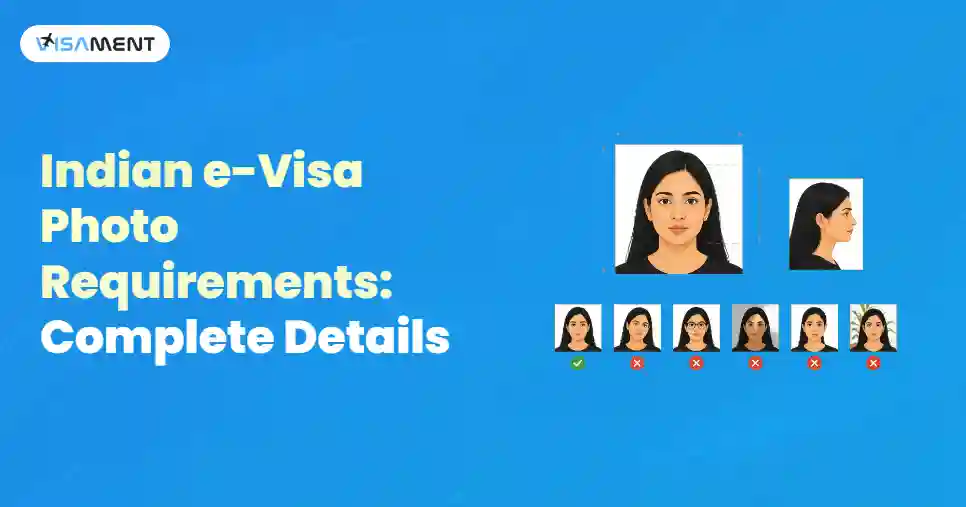
- Facial Expression: You must maintain a neutral facial expression and look directly at the camera. You can smile, but make sure that it is natural, gentle, and does not alter your facial features (in short, it does not cause wrinkles or squinting).
- Clothing: Choose comfortable everyday clothes. Avoid light-coloured clothes, as they will blend with the background of the picture.
- Glasses: Eyeglasses are allowed as long as there is no flash reflection or glare visible. Also, they cannot cover your eyes or any facial features, so you must avoid sunglasses or glasses with thick or big frames.
- Pose: Keep your head straight; otherwise, your pose should be natural and relaxed.
- Head Covering: Generally, they are unacceptable, but you can wear a head covering that has medical or religious purposes.
- Hair: You can wear any hairstyle, but it should not cover your face or go beyond the picture's frame.
You should follow these tips to ensure that your photo will get accepted by the authorities.
What are the India e-Visa Photo Size Requirements?
You can easily apply for your Indian visa online by using the government eVisa platform. To complete the e-Visa application, you need to submit a digital image following all the requirements and tick off the technical criteria below:
- File Size: 10 MB-300 MB
- Photo Format: JPEG
- Dimensions: 350x350-1000x1000 pixels
Say Goodbye to Visa Hassles – Get Your Indian E-visa!
Travel to India as often as you like! Enjoy unlimited and seamless trips.
Apply Now Indian Visa Photo Requirements: Face and Background
One of the important Indian e visa photo requirements is that the photo should present a full face front view, eyes open.
Face
The photo should show your full face, your head from the top of the forehead with both edges of the face, to the bottom of the chin.
Your face should be shown clearly, so try to avoid the following:
- too thick glasses (your eyes must be visible)
- No head coverings are allowed (except for religious reasons)
- pacifiers or head coverings in children's photos
You need to keep a natural expression on your face; try not to smile. Look straight at the camera while taking the photo.
Background and Lighting
For the Indian e-visa photos that need to be attached to the application, a perfect background would be light or completely white.
Here are the requirements that your photo must meet:
- It should have a white background (or at least a continuous-tone quality background)
- It should not have any unnecessary elements visible.
- It should be taken in a plain light with no shadows on the face.
What are the Indian eVisa Photo Requirements for Infants?
Most of the requirements are the same as for adults, but there are a few exceptions regarding babies and young children:
- Babies aged one year or less can keep their eyes closed.
- Babies and infants have more flexible requirements for their eyes and facial expressions.
- Children aged ten or younger have easier requirements related to their head height or eye position.
With a few of these exceptions, you should keep in mind that the full faces of your children should be shown in your children's Indian visa photographs. Also, your baby should be the only one present in the photo; there should not be any toys or other objects visible. The facial expression of your child should be neutral with a closed mouth, and the baby should be looking directly into the camera.
Can I Take My Visa Photo Myself?
Yes, you can take the visa photo for your Indian visa by yourself.
As you can easily apply for your Indian e-Visa online, you can also upload your Indian visa photo on your own and complete the application from the comfort of your home.
Three simple steps will ensure that you have a smooth experience for your visa photo-taking:
- Use a dedicated app that will help you create a biometric photograph.
- Click a photo; you can repeat this process as many times as you want for the perfect shot.
- Wait for a few minutes for your image to be checked for all official requirements.
Final Thoughts
The applicant's face photo is required to be attached to the electronic Indian visa application. The steps are quite simple, and you can complete them in a few minutes. You must make sure to follow the photo guidelines and upload the photograph when applying. Remember that your face should look natural. You should have a neutral expression on your face, do not smile, and make sure that there are no shadows in the picture.
You can also take assistance from the experts of Visament as they have many years of experience. They can adjust your photo dimensions and make it appropriate for the Indian visa applications. They can also fill out your application for an Indian e-Visa.


 Also Want to Know About